Check-in marketing for contractors
Your techs check in.
Google finds out.
Every job your crew finishes becomes a real page on your own WordPress site — written, checked and published about a minute after the tech hits submit.
- Submit to live
- ~60 sec
- One page grows
- 250 → 1,500 words
- Cell signal needed
- None
Watch how it works
 Watch the walkthrough
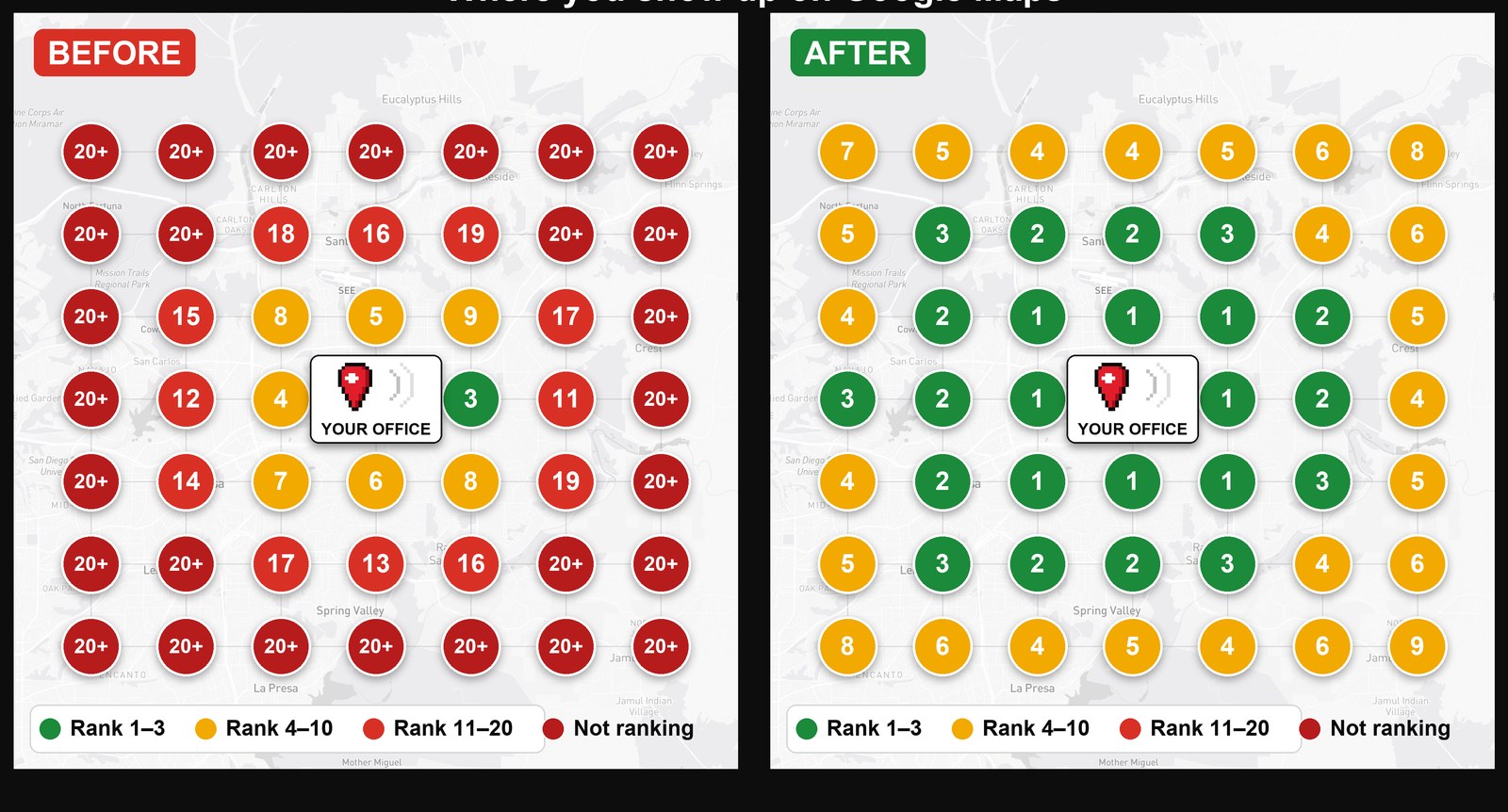
Two minutes, plain English: why Google only sees your office, and how a thirty-second check-in turns every job and inspection into a page on your site and a post on your Google Business Profile.
How does check-in marketing work?
Tech checks in from the driveway
2–4 photos, plain-talk notes, GPS. Thirty seconds on the phone, then back in the truck.
The page writes itself
Rough notes become clean copy in your company voice, with exact-length title and meta and full JSON-LD schema.
Live on your site + a GBP post
Published to your WordPress site in about a minute, with a copy-paste-ready Google Business Profile post beside it.
What Google sees — SearchResult.htmWhat does a published check-in look like?
A real page on your domain, in your theme — not a widget, not a feed. Here is the search-result side of one plumbing check-in:
Water Heater Replacement in Escondido, CA | Your Company
yourcompany.com › projects › escondido › water-heater-replacement
Our tech replaced a 50-gallon water heater near Bear Valley Pkwy in Escondido. See the photos, what the job involved, and what to watch for on yours.
- LocalBusiness
- Service
- Place
- ImageObject
Titles land at 50–60 characters, metas at 140–160, headings in strict order, and the schema validates. No keyword stuffing, no city-swap templates — the patterns that get sites penalized are blocked at the generator.
One page, growingWhy publish one URL per project?
A restoration job isn’t four thin pages. It’s one page that gets stronger every visit: each check-in re-publishes the same URL with new photos, new copy, and richer schema. Authority accumulates instead of fragmenting.
- Inspection
1. ~250 words
- Sold
2. copy shifts
- Repairs
3. photos stack up
- Complete
4. ~1,500-word case study
/projects/escondido/water-damage-restoration/ — same URL, day 1 to done.
Everything in the box — Features.dllEverything in the box
Works offline
No signal in the crawlspace? The check-in queues on the phone and publishes itself when coverage returns.
Evolving URLs
One page per project, re-published at every stage. Word count and ranking authority grow together.
GBP posts included
Every check-in generates a copy-paste-ready Google Business Profile post with photos attached.
Live job map
The office dashboard shows every crew on a map, a project kanban, and one-click pull-down or edit.
Tech bylines
Pages credit the tech who did the work — name, years on the tools, certifications. Real people, real jobs.
Privacy built in
Public pages fuzz locations by about half a mile. No customer names or street addresses, ever.
Want the detail on each one? Take the contractor check-in app feature tour.
What does it cost?
Starter
$99/mo
- 30 check-ins / month
- Unlimited techs
- WordPress plugin + live map
- GBP post for every check-in
- Email support
ProPro
$149/mo
- 100 check-ins / month
- Unlimited techs
- WordPress plugin + live map
- GBP post for every check-in
- Email support
Scale
$197/mo
- 250 check-ins / month
- Unlimited techs
- WordPress plugin + live map
- GBP post for every check-in
- Email support
FAQ.hlpQuestions contractors ask us
Does it work with my WordPress theme?
Yes. Published pages inherit your theme so they look like the rest of your site, or use our theme-native mode if you want tighter control. Either way, they live on your domain.
What about my customers’ privacy?
Public pages show a fuzzed location — a nearby intersection or neighborhood, roughly half a mile off. Exact GPS stays private on your dashboard. Customer names and street addresses never appear in published content.
Do I need to know anything about SEO?
No. Title lengths, meta descriptions, heading structure, and schema markup are handled automatically and checked against Google’s guidelines before every publish. Your techs just document the work.
What if my tech has no signal at the job site?
The check-in saves on the phone and shows “Saved — will publish when you’re back online.” As soon as coverage returns, it submits itself. Nothing gets lost, nothing needs re-typing.
Which trades do you support?
Plumbing and restoration today, with per-trade content patterns for each — a drain cleaning reads differently than a water-damage case study. Roofing and electrical are next on the roadmap.
Get startedYour crew already does the work.
Put it where Google can see it.
Connect your WordPress site, add your techs, and the next job they finish becomes a page. Setup takes one afternoon, not one quarter.